

5.2c Agent Permissions & Security
Precisely control what Agents can and cannot do.
📝 Course Notes
Key concepts from this lesson:
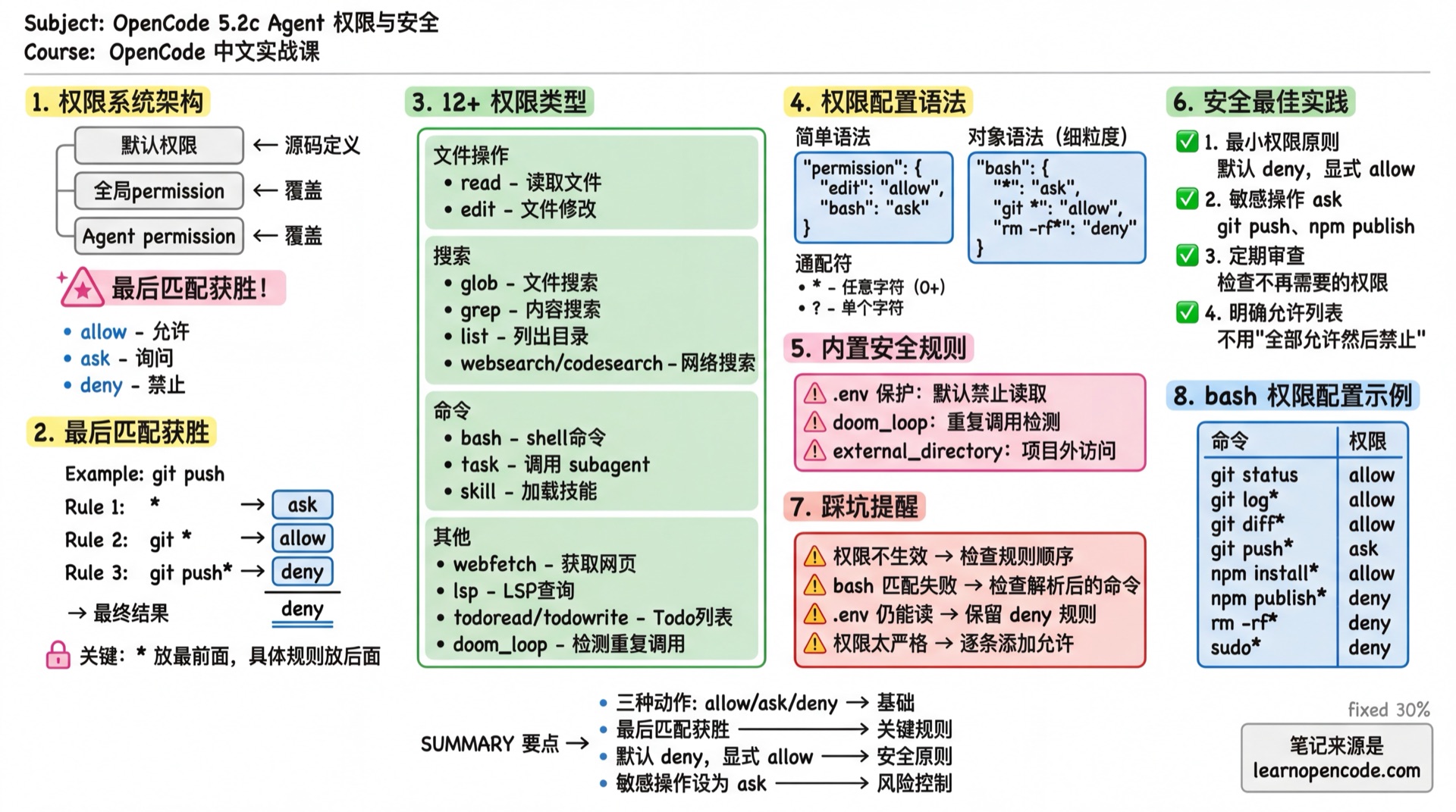
What You'll Learn
- Understand the permission system architecture
- Configure bash/edit/task/skill permissions
- Design secure Agent systems
- Implement the principle of least privilege
Permission System Architecture
Three Permission Actions
| Action | Description | Effect |
|---|---|---|
allow | Allow | Execute directly, no confirmation needed |
ask | Ask | Show confirmation dialog, user decides |
deny | Deny | Refuse to execute, Agent receives error |
Permission Configuration Hierarchy
Default Permissions (defined in source code)
    ↓ overrides
Global Config permission
    ↓ overrides
Agent-level permission
Later configurations override earlier ones.
Source:
config.ts:418-447,agent.ts:194
Rule Priority: Last Match Wins
This is the most important rule! When multiple rules match, the last matching rule wins.
{
  "permission": {
    "bash": {
      "*": "ask",           // Rule 1: All commands need confirmation
      "git *": "allow",     // Rule 2: git commands allowed
      "git push*": "deny"   // Rule 3: git push denied
    }
  }
}
Executing git push origin main:
- Matches Rule 1 (
*) → ask - Matches Rule 2 (
git *) → allow - Matches Rule 3 (
git push*) → deny - Final result: deny (Rule 3 is last)
Source:
agents.mdx:473,permissions.mdx:70
Configurable Permission Types
| Permission | Match Target | Description |
|---|---|---|
read | File path | Read files |
edit | File path | All file modifications (edit/write/patch/multiedit) |
glob | glob pattern | File search |
grep | Regex pattern | Content search |
list | Directory path | List directory contents |
bash | Command string | Execute shell commands |
task | subagent name | Call sub-agents |
skill | skill name | Load skills |
lsp | - | LSP queries (currently no fine-grained support) |
todoread | - | Read Todo list |
todowrite | - | Update Todo list |
webfetch | URL | Fetch web content |
websearch | Query string | Web search |
codesearch | Query string | Code search |
external_directory | - | Access paths outside project directory |
doom_loop | - | Detect repeated calls (same tool called 3 times with same input) |
Source:
config.ts:418-447
Permission Configuration Syntax
Simple Syntax: Single Action
{
  "permission": {
    "edit": "allow",      // All file edits allowed
    "bash": "ask",        // All commands need confirmation
    "webfetch": "deny"    // Web fetching denied
  }
}
Global Setting
{
  "permission": "allow"   // All permissions allowed
}
Object Syntax: Fine-grained Control
{
  "permission": {
    "bash": {
      "*": "ask",              // Default: need confirmation
      "git status": "allow",   // git status allowed
      "git log*": "allow",     // git log commands allowed
      "rm -rf*": "deny"        // rm -rf denied
    }
  }
}
Wildcards
| Symbol | Meaning | Example |
|---|---|---|
* | Match any characters (0 or more) | git * matches git status, git log |
? | Match single character | file?.txt matches file1.txt |
bash Permission Details
The bash permission matches the parsed command string.
Common Configuration
{
  "permission": {
    "bash": {
      "*": "ask",                    // Default: need confirmation

      // Git commands
      "git status": "allow",
      "git log*": "allow",
      "git diff*": "allow",
      "git branch*": "allow",
      "git checkout*": "ask",        // Branch switch needs confirmation
      "git push*": "ask",            // Push needs confirmation
      "git reset --hard*": "deny",   // Hard reset denied

      // Package management
      "npm install*": "allow",
      "npm run*": "allow",
      "npm publish*": "deny",        // Publishing denied

      // Dangerous commands
      "rm -rf*": "deny",
      "sudo*": "deny",
      "chmod 777*": "deny"
    }
  }
}
Best Practice for Plan Agent
{
  "agent": {
    "plan": {
      "permission": {
        "bash": {
          "*": "deny",               // Default: deny all
          "git log*": "allow",       // Read-only commands allowed
          "git diff*": "allow",
          "git status": "allow",
          "ls*": "allow",
          "cat*": "allow",
          "head*": "allow",
          "tail*": "allow"
        }
      }
    }
  }
}
edit Permission Details
The edit permission controls all file modification operations, including:
edittoolwritetoolpatchtoolmultiedittool
Common Configuration
{
  "permission": {
    "edit": {
      "*": "allow",                    // Default: allow

      // Sensitive files
      "*.env": "deny",
      "*.env.*": "deny",
      "*.env.example": "allow",        // Example files allowed
      ".env.local": "deny",

      // System files
      "package-lock.json": "deny",     // Don't modify lock files
      "pnpm-lock.yaml": "deny",
      "yarn.lock": "deny",

      // Directories
      "node_modules/*": "deny",
      ".git/*": "deny",
      "dist/*": "deny"
    }
  }
}
Read-only Agent Configuration
{
  "agent": {
    "readonly-auditor": {
      "description": "Read-only code audit, no file modifications",
      "mode": "subagent",
      "permission": {
        "edit": "deny"                 // Deny all edits
      }
    }
  }
}
task Permission: Control Subagent Calls
The task permission controls which subagents an Agent can call.
How It Works
When task: deny is set:
- The subagent is completely removed from the Task tool's description
- The model won't attempt to call it (because it can't see it)
Note: Users can still manually call any subagent via
@agent-name. The task permission only affects automatic Agent calls.Source:
agents.mdx:557-565
Configuration Example
{
  "agent": {
    "safe-orchestrator": {
      "description": "Security orchestrator, can only call specified subagents",
      "mode": "primary",
      "permission": {
        "task": {
          "*": "deny",                   // Deny all
          "docs-writer": "allow",        // Allow docs
          "code-reviewer": "allow",      // Allow review
          "dangerous-agent": "deny"      // Explicitly deny
        }
      }
    }
  }
}
Using Wildcards
{
  "agent": {
    "orchestrator": {
      "permission": {
        "task": {
          "*": "deny",
          "safe-*": "allow",            // All safe-* allowed
          "internal/*": "allow",        // Nested directory allowed
          "code-reviewer": "ask"        // Needs confirmation
        }
      }
    }
  }
}
TaskTool Parameter Details
The complete parameter definition for the Task tool:
| Parameter | Type | Required | Description |
|---|---|---|---|
description | string | Yes | Task description (3-5 words), used as sub-session title |
prompt | string | Yes | Task prompt for the sub-agent to execute |
subagent_type | string | Yes | Sub-agent name to call (must be non-primary agent) |
session_id | string | No | Continue an existing sub-session |
command | string | No | Command that triggered this task (for debugging) |
Execution Flow
The TaskTool workflow:
Main Agent (Build)
    ↓
    1. Permission Check
       - Check if caller has task permission
       - Filter accessible subagents
       ↓
    2. Create Sub-session
       - Create independent session under main session
       - Title: description + (@subagent subagent)
       - Apply restricted permissions (todowrite/todoread/task)
       ↓
    3. Call Sub-agent
       - Sub-agent executes in independent session
       - Context only contains passed prompt
       - Listen to PartUpdated events for progress
       ↓
    4. Return Result
       - Collect all tool call summaries
       - Generate conversation summary
       - Return to Main Agent
Key Point: Sub-agents run in independent Sessions and cannot see the Main Agent's conversation history. You must provide complete context when calling.
Default Restrictions for Sub-agents
To prevent infinite recursion, sub-agents (whether called via task or @ manually) have the following hardcoded restrictions:
| Restriction | Description | Reason |
|---|---|---|
todowrite: deny | Deny writing to todo list | Prevent sub-agent from interfering with Main Agent task management |
todoread: deny | Deny reading todo list | Same as above |
task: deny | Deny calling other sub-agents | Prevent infinite recursion |
Practical Usage Examples
Configure to Allow Specific Sub-agents
{
  "agent": {
    "orchestrator": {
      "description": "Task orchestration Agent, can call specialized sub-agents",
      "mode": "primary",
      "permission": {
        "task": {
          "docs-writer": "allow",      // Allow docs writing
          "code-reviewer": "allow",    // Allow code review
          "general": "allow",          // Allow general tasks
          "*": "deny"                  // Deny others
        }
      }
    }
  }
}
Agent Internal TaskTool Call
# Pseudo-code example
Main Agent receives: Help me write API documentation

1. Analyze task type → Determine docs-writer sub-agent is needed
2. Call TaskTool:
   - description: "Write API documentation"
   - prompt: "Write documentation for the following functions..."
   - subagent_type: "docs-writer"
3. Sub-agent executes → Returns documentation content
4. Main Agent receives result → Continues conversation
Continue Sub-session
When a sub-agent needs to execute in steps, you can pass session_id to continue previous work:
TaskTool(
  description: "Complete documentation",
  prompt: "Check documentation completeness and fill in missing content",
  subagent_type: "docs-writer",
  session_id: "abc123"  // Continue previous session
)Source:
packages/opencode/src/tool/task.ts:23-193
skill Permission: Control Skill Loading
The skill permission controls which skills an Agent can load.
Configuration Example
{
  "agent": {
    "restricted-agent": {
      "description": "Restricted Agent, can only use specified skills",
      "mode": "subagent",
      "permission": {
        "skill": {
          "*": "deny",                   // Deny all skills
          "docs-writer": "allow",        // Only allow docs skill
          "translator": "allow"
        }
      }
    }
  }
}
Source:
skill.ts:15-21
Built-in Security Rules
OpenCode has some default security rules configured:
.env File Protection
// Built-in default configuration
{
  "permission": {
    "read": {
      "*": "allow",
      "*.env": "deny",          // .env files denied
      "*.env.*": "deny",        // .env.xxx also denied
      "*.env.example": "allow"  // Example files allowed
    }
  }
}
Source:
agent.ts:51-56
doom_loop Detection
When the same tool is called 3 times consecutively with identical input, doom_loop detection is triggered.
{
  "permission": {
    "doom_loop": "ask"    // Default: prompt user for confirmation
  }
}
external_directory Protection
When an Agent attempts to access paths outside the project directory:
{
  "permission": {
    "external_directory": "ask"    // Default: prompt user for confirmation
  }
}
Implicit Restrictions for Sub-agents
Besides configured permissions, sub-agents (whether subagent mode or called all mode) have the following hardcoded restrictions:
Todo Tools Disabled
- Sub-agents can never use
todowriteandtodoread. - This prevents sub-agents from interfering with Main Agent's task list management.
- Sub-agents can never use
Primary Agent Exclusive Tools Disabled
- Tools configured in
primary_toolscannot be used by sub-agents.
- Tools configured in
Task Nesting Restriction
- Sub-agents cannot call other sub-agents by default (unless explicitly granted
taskpermission). - Example:
explorecannot callgeneralbecause its default permission is*: deny.
Why this design?
- Prevent infinite recursion: Avoid circular call chains between sub-agents that never complete
- Control complexity: Make task execution paths more predictable and easier to debug
- Resource management: Each sub-agent call creates a new session, consuming tokens and compute
- Separation of concerns: Sub-agents should focus on one thing, orchestration is for the main agent
- Sub-agents cannot call other sub-agents by default (unless explicitly granted
Agent-level Permission Override
Permissions set in Agent configuration override global permissions.
JSON Configuration
{
  "permission": {
    "bash": {
      "*": "ask",
      "git status": "allow"
    }
  },
  "agent": {
    "build": {
      "permission": {
        "bash": {
          "git push": "allow"       // build agent additionally allows push
        }
      }
    },
    "plan": {
      "permission": {
        "bash": {
          "*": "deny",              // plan agent denies all commands
          "git log*": "allow"       // except viewing logs
        }
      }
    }
  }
}
Markdown Configuration
---
description: Read-only audit Agent
mode: subagent
permission:
  edit: deny
  bash:
    "*": deny
    "git log*": allow
    "git diff*": allow
  webfetch: deny
---

Only analyzes code, makes no modifications.
Security Best Practices
1. Principle of Least Privilege
Only grant the minimum permissions an Agent needs to complete its task.
// ❌ Bad: Too permissive
{
  "agent": {
    "my-agent": {
      "permission": "allow"
    }
  }
}

// ✅ Good: Explicitly list needed permissions
{
  "agent": {
    "my-agent": {
      "permission": {
        "read": "allow",
        "edit": {
          "docs/*": "allow"
        },
        "bash": "deny"
      }
    }
  }
}
2. Explicitly List Allowed Commands
// ❌ Bad: Allow all, then deny dangerous ones
{
  "permission": {
    "bash": {
      "*": "allow",
      "rm -rf*": "deny"
    }
  }
}

// ✅ Good: Deny all, then allow needed ones
{
  "permission": {
    "bash": {
      "*": "deny",
      "git status": "allow",
      "npm test": "allow"
    }
  }
}
3. Set Sensitive Operations to ask
{
  "permission": {
    "bash": {
      "*": "allow",
      "git push*": "ask",        // Push needs confirmation
      "npm publish*": "ask",     // Publish needs confirmation
      "docker *": "ask"          // Docker operations need confirmation
    }
  }
}
4. Regularly Review Permission Configuration
Checklist:
- [ ] Are there permissions no longer needed?
- [ ] Are all sensitive operations set to ask?
- [ ] Are new Agent permissions reasonable?
Common Pitfalls
| Symptom | Cause | Solution |
|---|---|---|
| Permission not working | Wrong rule order | Put * first, specific rules after |
| Subagent still callable | User @ calls are unrestricted | task permission only affects Task tool |
| bash command match fails | Matches parsed command | Check actual command format (with arguments) |
| .env still readable | Custom rule overrode default | Remember to keep .env deny rule |
| Permissions too strict | Set *: deny forgot to allow necessary ones | Add allow rules one by one |
Relationship with 5.5 Permission Control
This chapter focuses on Agent-level permission configuration.
For global permission configuration and more details, see 5.5 Permission Control.
Lesson Summary
You learned:
- Permission System Architecture: Three actions, configuration hierarchy, last match wins
- 12+ Permission Types: bash, edit, task, skill, etc.
- Fine-grained Control: Using object syntax and wildcards
- TaskTool Mechanism: Sub-agent calls, parameter definition, execution flow
- Sub-agent Restrictions: todowrite/todoread/task disabled to prevent infinite recursion
- Built-in Security Rules: .env protection, doom_loop, external_directory
- Security Best Practices: Least privilege, explicit allow, sensitive operations ask
Next Lesson Preview
With permissions configured, there are more advanced techniques: tool interface design, pass-through parameters, debugging methods.
Next Lesson: 5.2d Agent Advanced Techniques