

Plugins Advanced
💡 One-line summary: Master all hook types and implement advanced plugin features.
📝 Course Notes
Key knowledge points from this lesson:
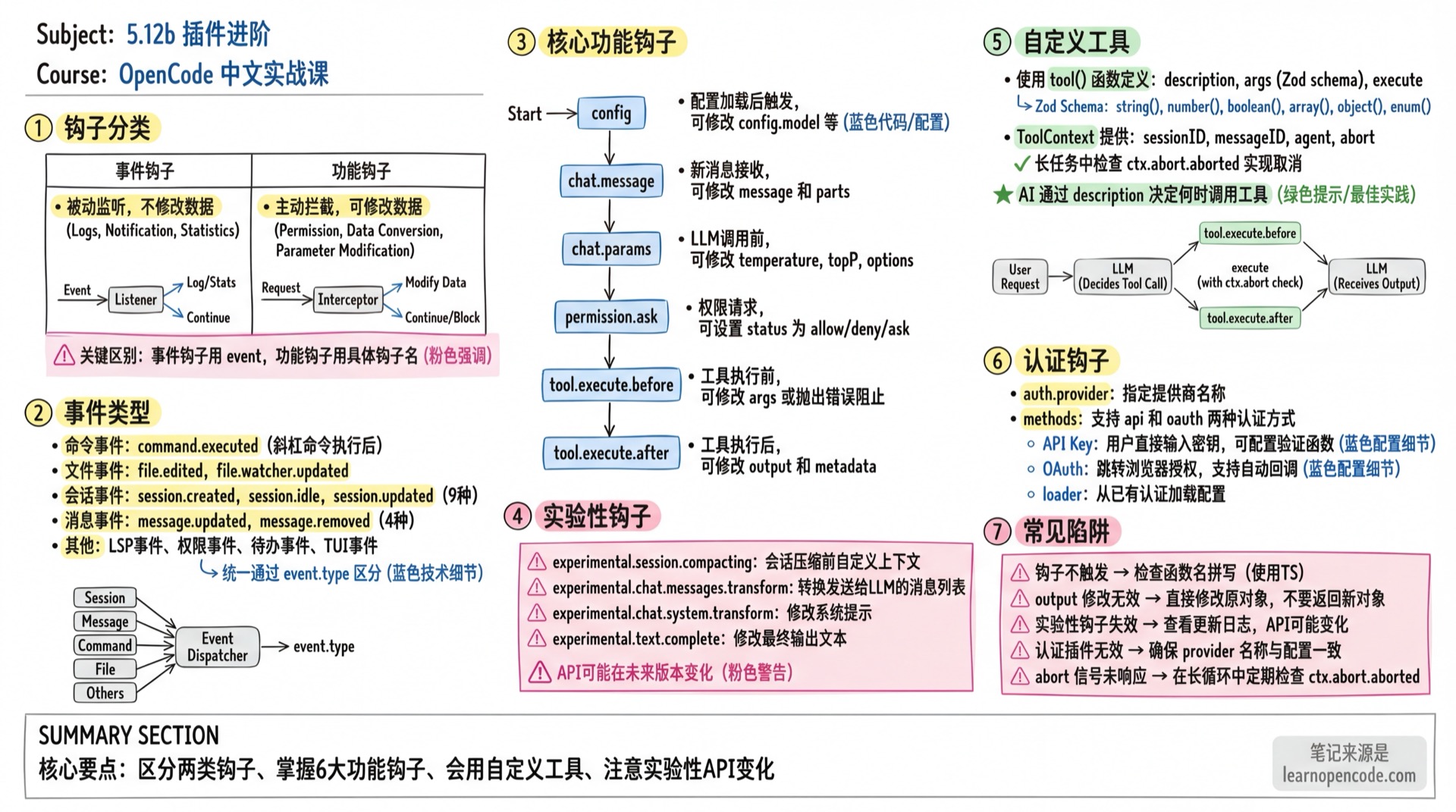
What You'll Be Able to Do
- Understand the difference between event hooks and functional hooks
- Use all available hook types
- Create custom tools
- Implement authentication plugins
Hook Categories
OpenCode plugins have two types of hooks:
| Type | Characteristics | Use Cases |
|---|---|---|
| Event Hooks | Passive listening, no data modification | Logging, notifications, statistics |
| Functional Hooks | Active interception, can modify data | Permission control, parameter modification, data transformation |
Event Hooks
Subscribe to all events using event:
export const MyPlugin: Plugin = async () => {
  return {
    event: async ({ event }) => {
      console.log(`Event: ${event.type}`, event.properties)
    },
  }
}
Functional Hooks
Intercept specific operations using concrete hook names:
export const MyPlugin: Plugin = async () => {
  return {
    "tool.execute.before": async (input, output) => {
      // Can modify output to affect subsequent execution
      console.log(`Tool: ${input.tool}`)
    },
  }
}
Event Types
All events are subscribed via the event hook and distinguished by event.type:
Command Events
| Event | Trigger Timing |
|---|---|
command.executed | After slash command execution |
File Events
| Event | Trigger Timing |
|---|---|
file.edited | After file is edited |
file.watcher.updated | File watcher detects changes |
Installation Events
| Event | Trigger Timing |
|---|---|
installation.updated | After OpenCode installation/update |
LSP Events
| Event | Trigger Timing |
|---|---|
lsp.client.diagnostics | LSP diagnostics update |
lsp.updated | LSP service status change |
Message Events
| Event | Trigger Timing |
|---|---|
message.part.removed | Message part is deleted |
message.part.updated | Message part is updated |
message.removed | Message is deleted |
message.updated | Message is updated |
Permission Events
| Event | Trigger Timing |
|---|---|
permission.replied | User responds to permission request |
permission.updated | Permission status change |
Server Events
| Event | Trigger Timing |
|---|---|
server.connected | Server connection successful |
Session Events
| Event | Trigger Timing |
|---|---|
session.created | New session created |
session.compacted | Session compaction completed |
session.deleted | Session is deleted |
session.diff | Session diff generated |
session.error | Session error occurs |
session.idle | Session enters idle state (AI response complete) |
session.status | Session status change |
session.updated | Session info update |
Todo Events
| Event | Trigger Timing |
|---|---|
todo.updated | Todo list update |
TUI Events
| Event | Trigger Timing |
|---|---|
tui.prompt.append | Content appended to prompt |
tui.command.execute | TUI command execution |
tui.toast.show | Show toast notification |
Functional Hooks Details
config
Triggered after config is loaded, can modify configuration:
export const MyPlugin: Plugin = async () => {
  return {
    config: async (config) => {
      // config: Config object (see config.ts for full type definition)
      // Can directly modify properties, e.g.:
      config.model = "anthropic/claude-opus-4-5-thinking"
    },
  }
}
Parameter Type: config: Config (read/write)
chat.message
Triggered when new message is received, can modify message content:
export const MyPlugin: Plugin = async () => {
  return {
    "chat.message": async (input, output) => {
      // input: { sessionID, agent, model, messageID, variant }
      // output: { message, parts }
      console.log(`New message in session: ${input.sessionID}`)
    },
  }
}
input Type:
| Field | Type | Description |
|---|---|---|
sessionID | string | Session ID |
agent | string | Agent name |
model | { providerID, modelID } | Model info |
messageID | string | Message ID |
variant | string | Message variant |
output Type:
| Field | Type | Description |
|---|---|---|
message | Message | Message object (modifiable) |
parts | Part[] | Message content parts (modifiable) |
chat.params
Triggered before LLM call, can modify model parameters:
export const MyPlugin: Plugin = async () => {
  return {
    "chat.params": async (input, output) => {
      // input: { sessionID, agent, model, provider, message }
      // output: { temperature, topP, topK, options }

      // Force low temperature
      output.temperature = 0.3

      // Add custom options (passed as HTTP headers)
      output.options.customHeader = "my-value"
    },
  }
}
input Type:
| Field | Type | Description |
|---|---|---|
sessionID | string | Session ID |
agent | string | Agent name |
model | { providerID, modelID } | Model info |
provider | Provider | Provider object |
message | Message | Current message |
output Type (modifiable):
| Field | Type | Description |
|---|---|---|
temperature | number? | Temperature parameter |
topP | number? | Top-P parameter |
topK | number? | Top-K parameter |
options | Record<string, unknown> | Custom options (passed as HTTP headers) |
permission.ask
Triggered on permission request, can modify permission decision:
export const MyPlugin: Plugin = async () => {
  return {
    "permission.ask": async (input, output) => {
      // input: Permission object
      // output: { status: "ask" | "deny" | "allow" }

      // Auto-allow specific tools
      if (input.tool === "read" && input.path?.startsWith("/safe/")) {
        output.status = "allow"
      }
    },
  }
}
tool.execute.before
Triggered before tool execution, can modify parameters or throw error to block execution:
export const MyPlugin: Plugin = async () => {
  return {
    "tool.execute.before": async (input, output) => {
      // input: { tool, sessionID, callID }
      // output: { args }

      if (input.tool === "bash" && output.args.command.includes("rm -rf")) {
        throw new Error("Dangerous command blocked!")
      }
    },
  }
}
input Type:
| Field | Type | Description |
|---|---|---|
tool | string | Tool name (e.g., read, bash, write) |
sessionID | string | Session ID |
callID | string | Tool call ID |
output Type (modifiable):
| Field | Type | Description |
|---|---|---|
args | Record<string, unknown> | Tool arguments (modifiable or interceptable) |
Throwing Error: Throwing Error will block tool execution, error message is returned to LLM.
tool.execute.after
Triggered after tool execution, can modify output:
export const MyPlugin: Plugin = async () => {
  return {
    "tool.execute.after": async (input, output) => {
      // input: { tool, sessionID, callID }
      // output: { title, output, metadata }

      // Add execution timestamp
      output.metadata.executedAt = new Date().toISOString()
    },
  }
}
input Type:
| Field | Type | Description |
|---|---|---|
tool | string | Tool name |
sessionID | string | Session ID |
callID | string | Tool call ID |
output Type (modifiable):
| Field | Type | Description |
|---|---|---|
title | string | Tool execution title (displayed in UI) |
output | string | Tool output content (returned to LLM) |
metadata | Record<string, unknown> | Metadata (freely addable) |
Experimental Hooks
⚠️ Warning: The following hooks are prefixed with
experimental.and API may change in future versions.
experimental.session.compacting
Triggered before session compaction, can customize compaction context:
export const CompactionPlugin: Plugin = async () => {
  return {
    "experimental.session.compacting": async (input, output) => {
      // input: { sessionID }
      // output: { context: string[], prompt?: string }

      // Method 1: Append extra context
      output.context.push(`
## Custom Context

Preserve the following state:
- Current task status
- Important decisions
- Files being processed
`)
    },
  }
}
Completely replace compaction prompt:
export const CustomCompactionPlugin: Plugin = async () => {
  return {
    "experimental.session.compacting": async (input, output) => {
      // Setting prompt completely replaces default compaction prompt
      // output.context array will be ignored
      output.prompt = `
You are generating a continuation prompt for a multi-agent session.

Please summarize:
1. Current task and its status
2. Files being modified and who is responsible
3. Dependencies between agents
4. Next steps to complete the work

Format as a structured prompt that a new agent can use to resume work.
`
    },
  }
}
experimental.chat.messages.transform
Triggered before messages are sent to LLM, can transform message list:
export const MyPlugin: Plugin = async () => {
  return {
    "experimental.chat.messages.transform": async (input, output) => {
      // output.messages: Array<{ info: Message, parts: Part[] }>

      // Filter certain messages
      output.messages = output.messages.filter(m =>
        !m.parts.some(p => p.type === "text" && p.text.includes("SECRET"))
      )
    },
  }
}
experimental.chat.system.transform
Triggered before system prompt is sent to LLM:
export const MyPlugin: Plugin = async () => {
  return {
    "experimental.chat.system.transform": async (input, output) => {
      // output.system: string[]

      // Append custom system instructions
      output.system.push("Always respond in formal English.")
    },
  }
}
experimental.text.complete
Triggered after text completion:
export const MyPlugin: Plugin = async () => {
  return {
    "experimental.text.complete": async (input, output) => {
      // input: { sessionID, messageID, partID }
      // output: { text }

      // Can modify the final output text
      output.text = output.text.replace(/\bAI\b/g, "Assistant")
    },
  }
}
Custom Tools
Plugins can add custom tools for AI to call:
import { type Plugin, tool } from "@opencode-ai/plugin"

export const CustomToolsPlugin: Plugin = async () => {
  return {
    tool: {
      mytool: tool({
        description: "This is a custom tool",
        args: {
          foo: tool.schema.string().describe("Input parameter"),
          count: tool.schema.number().optional().describe("Optional number parameter"),
        },
        async execute(args, ctx) {
          // args: { foo: string, count?: number }
          // ctx: ToolContext
          return `Hello ${args.foo}!`
        },
      }),
    },
  }
}
tool Function Parameters
| Parameter | Type | Description |
|---|---|---|
description | string | Tool description, AI decides when to use based on this |
args | Record<string, ZodType> | Define parameters using Zod schema |
execute | (args, ctx) => Promise<string> | Tool execution function |
ToolContext
The second parameter of execute function provides execution context:
| Property | Type | Description |
|---|---|---|
sessionID | string | Current session ID |
messageID | string | Current message ID |
agent | string | Agent name calling the tool |
abort | AbortSignal | Abort signal for canceling long operations |
Using abort Signal
tool({
  description: "Long running task",
  args: {},
  async execute(args, ctx) {
    for (let i = 0; i < 100; i++) {
      if (ctx.abort.aborted) {
        return "Task cancelled"
      }
      await doWork(i)
    }
    return "Task completed"
  },
})
Zod Schema Quick Reference
tool.schema is Zod, common types:
tool.schema.string()           // String
tool.schema.number()           // Number
tool.schema.boolean()          // Boolean
tool.schema.array(...)         // Array
tool.schema.object({...})      // Object
tool.schema.enum(["a", "b"])   // Enum
tool.schema.optional()         // Optional (chained)
tool.schema.describe("...")    // Description (chained)
Authentication Hooks
Plugins can implement custom authentication for providers:
export const MyAuthPlugin: Plugin = async () => {
  return {
    auth: {
      provider: "my-provider",

      // Optional: Load config from existing auth
      loader: async (auth, provider) => {
        const token = await auth()
        return { apiKey: token.key }
      },

      methods: [
        {
          type: "api",
          label: "API Key",
          prompts: [
            {
              type: "text",
              key: "apiKey",
              message: "Enter your API key",
              validate: (value) => value.length < 10 ? "Key too short" : undefined,
            },
          ],
          authorize: async (inputs) => {
            // Validate and return result
            return {
              type: "success",
              key: inputs.apiKey,
            }
          },
        },
        {
          type: "oauth",
          label: "OAuth Login",
          authorize: async () => {
            return {
              url: "https://example.com/oauth/authorize",
              instructions: "Complete login in browser",
              method: "auto",
              callback: async () => {
                // Wait for OAuth callback
                return {
                  type: "success",
                  access: "access_token",
                  refresh: "refresh_token",
                  expires: Date.now() + 3600000,
                }
              },
            }
          },
        },
      ],
    },
  }
}
Authentication Method Types
| Type | Description |
|---|---|
api | API Key method, user directly enters key |
oauth | OAuth method, redirects to browser for authorization |
prompts Configuration
| Type | Description |
|---|---|
text | Text input field |
select | Dropdown select |
Each prompt can configure:
key: Key name for input valuemessage: Prompt messagevalidate: Validation functioncondition: Condition function to determine whether to show this prompt
Complete Example: Time Tracking Plugin
import type { Plugin } from "@opencode-ai/plugin"

export const TimeTrackingPlugin: Plugin = async ({ client }) => {
  const sessionTimes = new Map<string, number>()

  return {
    event: async ({ event }) => {
      if (event.type === "session.created") {
        sessionTimes.set(event.properties.id, Date.now())
        await client.app.log({
          service: "time-tracking",
          level: "info",
          message: `Session started: ${event.properties.id}`,
        })
      }

      if (event.type === "session.idle") {
        const startTime = sessionTimes.get(event.properties.sessionID)
        if (startTime) {
          const duration = Date.now() - startTime
          await client.app.log({
            service: "time-tracking",
            level: "info",
            message: `Session duration: ${Math.round(duration / 1000)}s`,
            extra: { sessionID: event.properties.sessionID, duration },
          })
        }
      }
    },

    "chat.params": async (input, output) => {
      // Add tracking headers to all requests
      output.options["X-Session-ID"] = input.sessionID
    },
  }
}
Common Pitfalls
| Symptom | Cause | Solution |
|---|---|---|
| Hook doesn't trigger | Function name typo | Use TypeScript for type checking |
output modification ineffective | Returned new object instead of modifying original | Directly modify output.xxx = ... |
| Experimental hook fails | API changed after version update | Check changelog, adjust code |
| Auth plugin ineffective | provider name mismatch | Ensure it matches provider ID in config |
| abort signal not responding | Not checking ctx.abort.aborted | Periodically check in long loops |
Lesson Summary
You learned:
- The difference between event hooks and functional hooks
- All available hook types and their use cases
- Creating custom tools (with abort signal handling)
- Implementing authentication plugins
Related Resources
- 5.12a Plugins Basics - Plugin installation and basic usage
- 5.10 SDK Development - Using SDK client
- 5.13 Custom Tools - More tool development examples
- Ecosystem - Community plugin examples