

5.9b HTTP API Reference
💡 One-line summary: OpenCode server provides a complete REST API for programmatic interaction with OpenCode.
📝 Course Notes
Key concepts from this lesson:
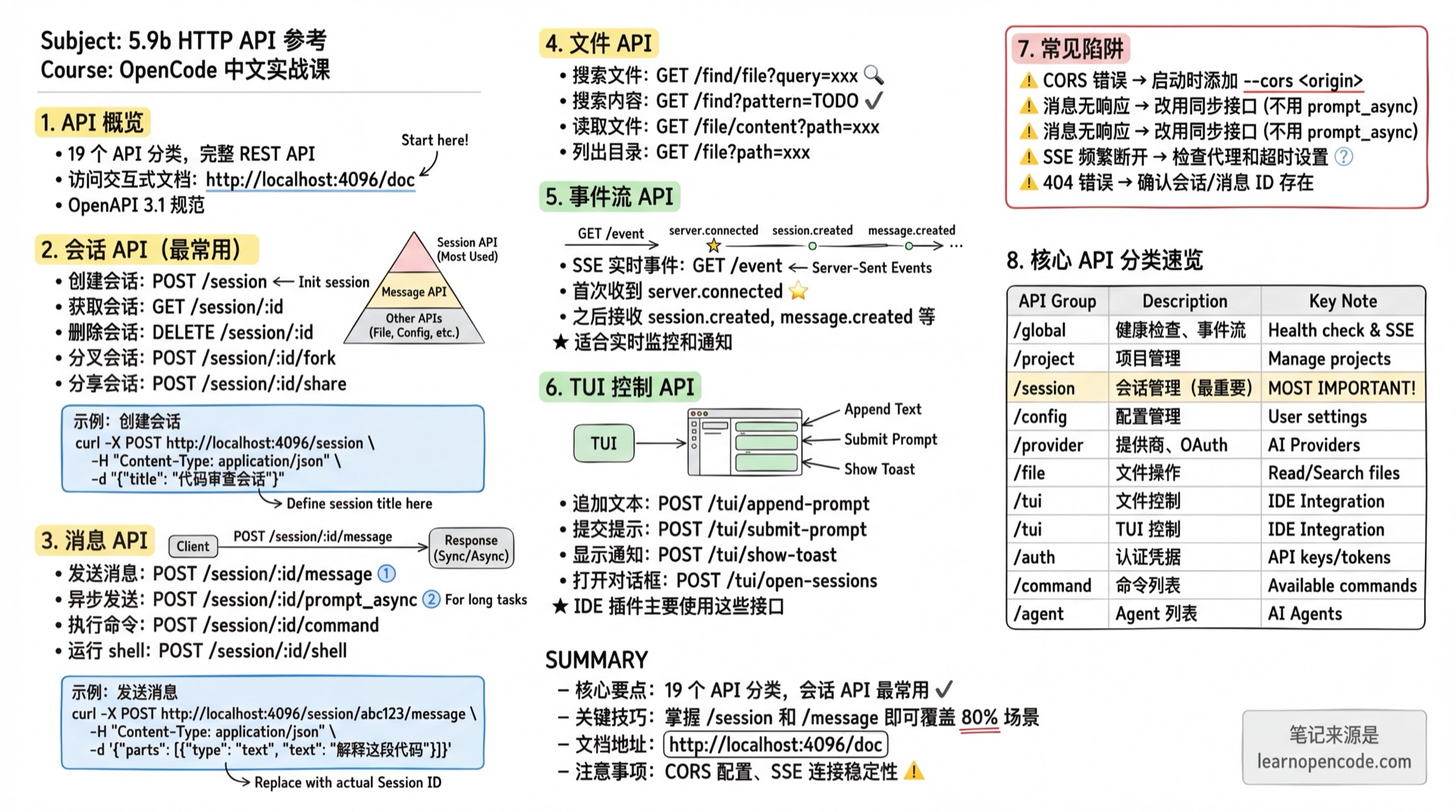
What You'll Learn
- Understand the overall structure of OpenCode API
- Manage sessions and messages using the API
- Execute commands and operate files via API
- Listen to SSE event streams
API Overview
OpenCode server publishes an OpenAPI 3.1 specification, viewable with interactive documentation at:
http://<hostname>:<port>/docExample: http://localhost:4096/doc
Authentication
If the server has OPENCODE_SERVER_PASSWORD environment variable set, all API requests require HTTP Basic Auth authentication.
curl Example
# With Basic Auth
curl -u opencode:your-password http://localhost:4096/global/health

# Or manually set Authorization header
curl -H "Authorization: Basic $(echo -n 'opencode:your-password' | base64)" \
  http://localhost:4096/global/health
Authentication Parameters
| Parameter | Description |
|---|---|
| Username | Default opencode, or value of OPENCODE_SERVER_USERNAME environment variable |
| Password | Value of OPENCODE_SERVER_PASSWORD environment variable |
Global API
/global
| Method | Path | Description | Response |
|---|---|---|---|
GET | /global/health | Server health status | { healthy: true, version: string } |
GET | /global/event | Global event stream (SSE) | Event stream |
Example:
# Check server health (no auth)
curl http://localhost:4096/global/health

# If server has password set
curl -u opencode:your-password http://localhost:4096/global/health
Response:
{
  "healthy": true,
  "version": "1.0.48"
}
Source:
opencode/packages/opencode/src/server/server.ts:131-150
Project API
/project
| Method | Path | Description | Response |
|---|---|---|---|
GET | /project | List all projects | Project[] |
GET | /project/current | Get current project | Project |
Source:
opencode/packages/web/src/content/docs/server.mdx:88-94
Path & Version Control API
/path, /vcs
| Method | Path | Description | Response |
|---|---|---|---|
GET | /path | Get current path | Path |
GET | /vcs | Get VCS info for current project | VcsInfo |
Source:
opencode/packages/web/src/content/docs/server.mdx:97-103
Instance API
/instance
| Method | Path | Description | Response |
|---|---|---|---|
POST | /instance/dispose | Destroy current instance | boolean |
Source:
opencode/packages/web/src/content/docs/server.mdx:106-111
Configuration API
/config
| Method | Path | Description | Response |
|---|---|---|---|
GET | /config | Get configuration info | Config |
PATCH | /config | Update configuration | Config |
GET | /config/providers | List providers and default models | { providers: Provider[], default: Record<string, string> } |
Source:
opencode/packages/web/src/content/docs/server.mdx:114-121
Provider API
/provider
| Method | Path | Description | Response |
|---|---|---|---|
GET | /provider | List all providers | { all: Provider[], default: {...}, connected: string[] } |
GET | /provider/auth | Get provider auth methods | { [providerID: string]: ProviderAuthMethod[] } |
POST | /provider/{id}/oauth/authorize | Initiate OAuth authorization | ProviderAuthAuthorization |
POST | /provider/{id}/oauth/callback | Handle OAuth callback | boolean |
Source:
opencode/packages/web/src/content/docs/server.mdx:124-132
Session API
/session
This is the most commonly used API for managing conversation sessions.
| Method | Path | Description | Notes |
|---|---|---|---|
GET | /session | List all sessions | Returns Session[] |
POST | /session | Create new session | body: { parentID?, title? } |
GET | /session/status | Get all session statuses | { [sessionID: string]: SessionStatus } |
GET | /session/:id | Get session details | Returns Session |
DELETE | /session/:id | Delete session and its data | Returns boolean |
PATCH | /session/:id | Update session properties | body: { title? } |
GET | /session/:id/children | Get child sessions | Returns Session[] |
GET | /session/:id/todo | Get session todo list | Returns Todo[] |
POST | /session/:id/init | Analyze app and create AGENTS.md | body: { messageID, providerID, modelID } |
POST | /session/:id/fork | Fork session from specified message | body: { messageID? } |
POST | /session/:id/abort | Abort running session | Returns boolean |
POST | /session/:id/share | Share session | Returns Session |
DELETE | /session/:id/share | Unshare session | Returns Session |
GET | /session/:id/diff | Get session file diff | query: messageID? |
POST | /session/:id/summarize | Summarize session | body: { providerID, modelID } |
POST | /session/:id/revert | Revert message | body: { messageID, partID? } |
POST | /session/:id/unrevert | Restore all reverted messages | Returns boolean |
POST | /session/:id/permissions/:permissionID | Respond to permission request | body: { response, remember? } |
Source:
opencode/packages/web/src/content/docs/server.mdx:135-157
Example - Create new session:
curl -X POST http://localhost:4096/session \
  -H "Content-Type: application/json" \
  -d '{"title": "Code Review Session"}'
Message API
/session/:id/message
| Method | Path | Description | Notes |
|---|---|---|---|
GET | /session/:id/message | List messages | query: limit? |
POST | /session/:id/message | Send message and wait for response | see body below |
GET | /session/:id/message/:messageID | Get message details | Returns { info, parts } |
POST | /session/:id/prompt_async | Send message asynchronously (no wait) | Returns 204 No Content |
POST | /session/:id/command | Execute slash command | body: { command, arguments, ... } |
POST | /session/:id/shell | Run shell command | body: { agent, model?, command } |
Send Message Request Body
{
  messageID?: string,     // Optional, message ID
  model?: string,         // Optional, specify model
  agent?: string,         // Optional, specify agent
  noReply?: boolean,      // Optional, don't wait for reply
  system?: string,        // Optional, system prompt
  tools?: string[],       // Optional, enabled tools
  parts: Part[]           // Message content
}
Source:
opencode/packages/web/src/content/docs/server.mdx:160-170
Example - Send message:
curl -X POST http://localhost:4096/session/abc123/message \
  -H "Content-Type: application/json" \
  -d '{
    "parts": [
      {"type": "text", "text": "Explain what this code does"}
    ]
  }'
Command API
/command
| Method | Path | Description | Response |
|---|---|---|---|
GET | /command | List all commands | Command[] |
Source:
opencode/packages/web/src/content/docs/server.mdx:173-178
File API
/find, /file
| Method | Path | Description | Response |
|---|---|---|---|
GET | /find?pattern=<pat> | Search file contents | Array of matches |
GET | /find/file?query=<q> | Find files by name | string[] (paths) |
GET | /find/symbol?query=<q> | Find workspace symbols | Symbol[] |
GET | /file?path=<path> | List directory contents | FileNode[] |
GET | /file/content?path=<p> | Read file content | FileContent |
GET | /file/status | Get tracked file status | File[] |
/find/file Query Parameters
| Parameter | Required | Description |
|---|---|---|
query | Yes | Search string (fuzzy match) |
type | No | Limit to "file" or "directory" |
directory | No | Override project root directory |
limit | No | Max results (1-200) |
dirs | No | Legacy parameter, "false" for files only |
Source:
opencode/packages/web/src/content/docs/server.mdx:181-199
Example - Search files:
# Search for files with "config" in the name
curl "http://localhost:4096/find/file?query=config&limit=10"

# Search file contents
curl "http://localhost:4096/find?pattern=TODO"
Tool API (Experimental)
/experimental/tool
| Method | Path | Description | Response |
|---|---|---|---|
GET | /experimental/tool/ids | List all tool IDs | ToolIDs |
GET | /experimental/tool?provider=<p>&model=<m> | Get available tools and JSON Schema for model | ToolList |
Source:
opencode/packages/web/src/content/docs/server.mdx:202-208
LSP, Formatter & MCP API
/lsp, /formatter, /mcp
| Method | Path | Description | Response |
|---|---|---|---|
GET | /lsp | Get LSP server status | LSPStatus[] |
GET | /formatter | Get formatter status | FormatterStatus[] |
GET | /mcp | Get MCP server status | { [name: string]: MCPStatus } |
POST | /mcp | Dynamically add MCP server | body: { name, config } |
POST | /mcp/:name/auth | Start MCP OAuth authentication | { authorizationUrl: string } |
POST | /mcp/:name/auth/callback | Handle MCP OAuth callback | boolean |
Source:
opencode/packages/web/src/content/docs/server.mdx:211-218,server.ts:2197-2230
Agent API
/agent
| Method | Path | Description | Response |
|---|---|---|---|
GET | /agent | List all available agents | Agent[] |
Source:
opencode/packages/web/src/content/docs/server.mdx:222-227
Log API
/log
| Method | Path | Description | Response |
|---|---|---|---|
POST | /log | Write log entry | boolean |
Request body:
{
  service: string,           // Service name
  level: "debug" | "info" | "warn" | "error",
  message: string,           // Log message
  extra?: Record<string, any> // Additional metadata
}
Source:
opencode/packages/web/src/content/docs/server.mdx:230-235
TUI Control API
/tui
Used for remote control of the TUI interface, primarily used by IDE plugins.
| Method | Path | Description | Response |
|---|---|---|---|
POST | /tui/append-prompt | Append text to prompt box | boolean |
POST | /tui/open-help | Open help dialog | boolean |
POST | /tui/open-sessions | Open session selector | boolean |
POST | /tui/open-themes | Open theme selector | boolean |
POST | /tui/open-models | Open model selector | boolean |
POST | /tui/submit-prompt | Submit current prompt | boolean |
POST | /tui/clear-prompt | Clear prompt box | boolean |
POST | /tui/execute-command | Execute command | body: { command } |
POST | /tui/show-toast | Show toast notification | body: { title?, message, variant } |
GET | /tui/control/next | Wait for next control request | Control request object |
POST | /tui/control/response | Respond to control request | body: { body } |
Source:
opencode/packages/web/src/content/docs/server.mdx:238-253
Example - Remote control TUI:
# Add text to prompt box
curl -X POST http://localhost:4096/tui/append-prompt \
  -H "Content-Type: application/json" \
  -d '{"text": "Please help me review this code"}'

# Submit prompt
curl -X POST http://localhost:4096/tui/submit-prompt

# Show notification
curl -X POST http://localhost:4096/tui/show-toast \
  -H "Content-Type: application/json" \
  -d '{"message": "Operation complete", "variant": "success"}'
Authentication API
/auth
| Method | Path | Description | Response |
|---|---|---|---|
PUT | /auth/:id | Set authentication credentials | boolean |
Request body must match the corresponding provider's schema.
Source:
opencode/packages/web/src/content/docs/server.mdx:256-261
Event Stream API
/event
| Method | Path | Description | Response |
|---|---|---|---|
GET | /event | SSE event stream | Server-sent events |
Upon connection, you first receive a server.connected event, followed by various bus events.
Source:
opencode/packages/web/src/content/docs/server.mdx:264-269
Example - Listen to events:
curl -N http://localhost:4096/eventOutput example:
event: server.connected
data: {}

event: session.created
data: {"id":"abc123","title":"New Session"}

event: message.created
data: {"sessionID":"abc123","content":"..."}
API Documentation
/doc
| Method | Path | Description | Response |
|---|---|---|---|
GET | /doc | OpenAPI 3.1 specification docs | HTML page |
Source:
opencode/packages/web/src/content/docs/server.mdx:272-277
Type Definitions
Complete TypeScript type definitions can be found in the SDK:
https://github.com/opencode-ai/opencode/blob/dev/packages/sdk/js/src/gen/types.gen.tsCommon types:
Session- Session infoMessage- Message infoPart- Message content partProvider- Provider infoAgent- Agent infoConfig- Configuration info
Common Pitfalls
| Issue | Cause | Solution |
|---|---|---|
| Request returns CORS error | Client origin not whitelisted | Add --cors <origin> when starting |
| No response after sending message | Used prompt_async | Use synchronous /session/:id/message instead |
| SSE connection drops frequently | Network timeout or proxy issues | Check proxy settings, increase timeout |
| 404 error | Session or message ID doesn't exist | Verify resource exists via GET endpoint first |
| Experimental API unavailable | Feature may change or be removed | Check latest docs to confirm |
Lesson Summary
You learned:
- API Structure: 19 API categories covering sessions, messages, files, tools, etc.
- Session Management: Create, query, fork, and share sessions
- Message Interaction: Send messages synchronously/asynchronously, execute commands
- File Operations: Search, read, and list files
- TUI Control: Remote control of TUI interface
- Event Listening: Receive real-time events via SSE
Related Resources
- 5.9a Remote Mode Basics - Server startup and remote connection
- 5.10 SDK - JavaScript/TypeScript SDK
- Official API Docs - Complete English documentation
Next Lesson Preview
In the next lesson, we'll learn how to develop using the SDK.