

5.8b ACP Protocol
Use OpenCode in Zed, JetBrains, Neovim, and other editors through the ACP protocol.
📝 Course Notes
Key points from this lesson:
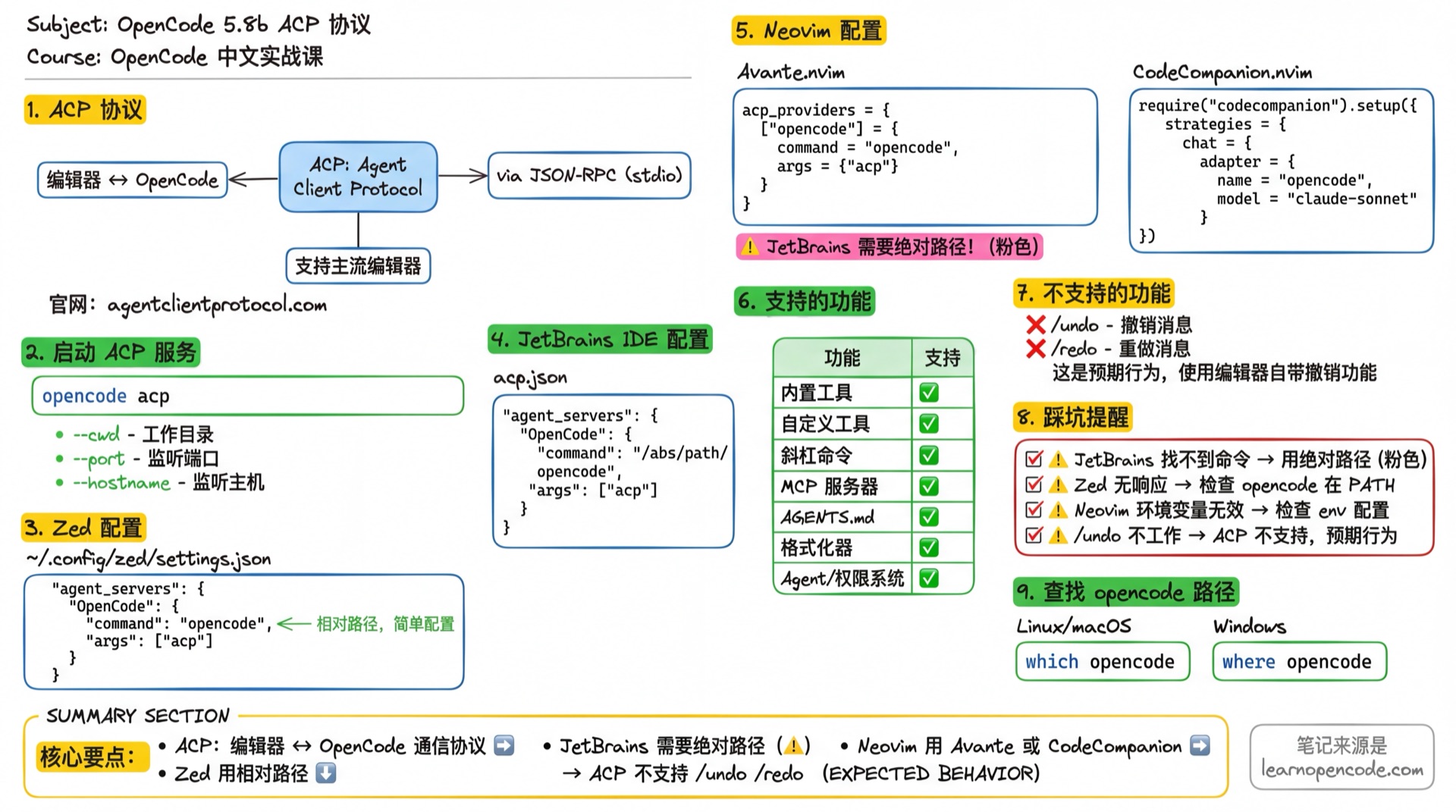
What You'll Learn
- Understand what ACP protocol is
- Configure OpenCode in Zed
- Configure OpenCode in JetBrains IDE
- Configure OpenCode in Neovim
What is ACP
ACP (Agent Client Protocol) is an open protocol that standardizes communication between code editors and AI coding agents.
- Official website: agentclientprotocol.com
- Supported editors list: ACP Progress Report
How It Works
Editor ←→ JSON-RPC (stdio) ←→ opencode acpThe editor starts opencode acp as a child process and communicates via stdin/stdout using nd-JSON (newline-delimited JSON) format for JSON-RPC communication.
Starting the ACP Service
opencode acpCommand Arguments
| Argument | Description | Example |
|---|---|---|
--cwd | Working directory | --cwd /path/to/project |
--port | Listen port | --port 4096 |
--hostname | Listen hostname | --hostname 0.0.0.0 |
Source:
cli.mdx:481-487,acp.ts:16-20
Zed Configuration
Add to Zed configuration file ~/.config/zed/settings.json:
{
  "agent_servers": {
    "OpenCode": {
      "command": "opencode",
      "args": ["acp"]
    }
  }
}
Usage
- Open the command palette
- Run
agent: new thread
Bind Keyboard Shortcut (Optional)
Edit keymap.json:
[
  {
    "bindings": {
      "cmd-alt-o": [
        "agent::NewExternalAgentThread",
        {
          "agent": {
            "custom": {
              "name": "OpenCode",
              "command": {
                "command": "opencode",
                "args": ["acp"]
              }
            }
          }
        }
      ]
    }
  }
]
JetBrains IDE Configuration
Supports all JetBrains IDEs (IntelliJ IDEA, WebStorm, PyCharm, etc.).
Create acp.json according to official documentation:
{
  "agent_servers": {
    "OpenCode": {
      "command": "/absolute/path/bin/opencode",
      "args": ["acp"]
    }
  }
}Note: JetBrains requires the absolute path to opencode.
Finding the opencode Path
# macOS / Linux
which opencode

# Windows
where opencode
Usage
Select "OpenCode" in the AI Chat agent selector.
Neovim Configuration
Avante.nvim
Add to Avante.nvim configuration:
{
  acp_providers = {
    ["opencode"] = {
      command = "opencode",
      args = { "acp" }
    }
  }
}
To pass environment variables:
{
  acp_providers = {
    ["opencode"] = {
      command = "opencode",
      args = { "acp" },
      env = {
        OPENCODE_API_KEY = os.getenv("OPENCODE_API_KEY")
      }
    }
  }
}
CodeCompanion.nvim
Add to CodeCompanion.nvim configuration:
require("codecompanion").setup({
  strategies = {
    chat = {
      adapter = {
        name = "opencode",
        model = "claude-sonnet-4",
      },
    },
  },
})
To pass environment variables, refer to CodeCompanion documentation.
Supported Features
Using OpenCode via ACP provides the same functionality as the terminal version:
| Feature | Supported |
|---|---|
| Built-in tools (file operations, terminal commands, etc.) | ✅ |
| Custom tools and slash commands | ✅ |
| MCP servers | ✅ |
AGENTS.md project rules | ✅ |
| Custom formatters | ✅ |
| Agent and permission system | ✅ |
Unsupported Features
The following TUI-specific commands are not available in ACP mode:
/undo- Undo message/redo- Redo message
Source:
acp.mdx:147-149
Troubleshooting
| Symptom | Cause | Solution |
|---|---|---|
| JetBrains can't find command | Using relative path | Use absolute path for opencode |
| Zed not responding | opencode not installed or not in PATH | Confirm which opencode returns correct path |
| Neovim environment variables not working | Not passing env correctly | Use env = { ... } configuration |
/undo not working | ACP doesn't support this command | This is expected behavior, use editor's built-in undo |
Further Reading
- 5.8a VS Code Extension - VS Code/Cursor extension installation
- Cheatsheet / CLI Reference - Complete command-line options
- ACP Official Website - Protocol specification
Lesson Summary
You learned:
- Basic concepts of ACP protocol
- Zed editor configuration (settings.json + keymap)
- JetBrains IDE configuration (requires absolute path)
- Neovim configuration (Avante.nvim, CodeCompanion.nvim)
- ACP mode feature limitations
Next Lesson Preview
In the next lesson, we'll learn about remote mode, running OpenCode on a server and accessing it through a web interface.